

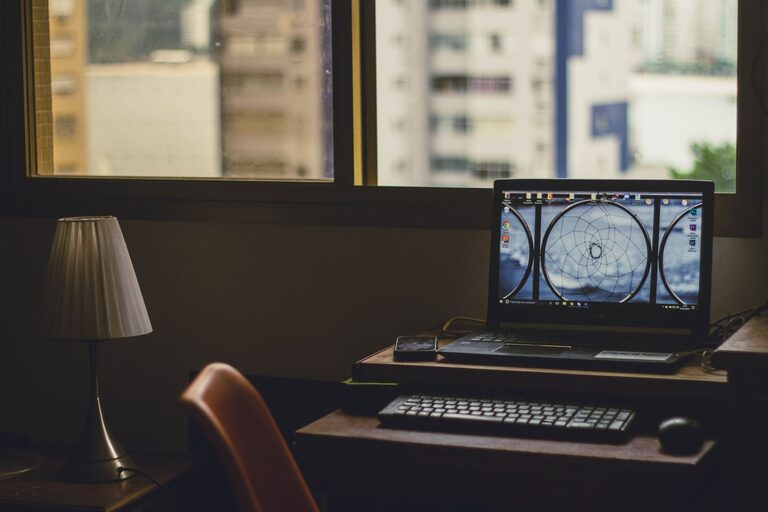
Working from home can be comfortable and convenient, but a poorly designed workspace may feel distracting or stressful. A relaxing home workspace does not need to be large or expensive. With a few thoughtful changes, you can create a place that supports focus while also helping you feel calm and comfortable.
The goal is to balance practical needs with a welcoming atmosphere. Your workspace should have enough light, keep essential items within reach, and include details that make you enjoy spending time there.
Choose the Right Location
Start by choosing the best available spot in your home. If you have a separate room, you can create a dedicated office. If not, a corner of a living room, bedroom, or dining area can work well.
Consider these factors when selecting a location:
– Natural light from a nearby window
– Distance from noisy appliances or busy walkways
– Enough space for a desk and chair
– Access to power outlets
– A background that feels simple and uncluttered
A quiet location can make it easier to concentrate, but complete silence is not essential. Some people enjoy gentle background sounds, such as soft music or natural noise. Choose a space that suits your routine and reduces interruptions.
If your workspace shares a room with another activity, use a small rug, bookcase, or folding screen to define the area. Creating a visual boundary can help separate work time from the rest of your home.
Select a Comfortable Desk and Chair
Comfort should be a priority when setting up your workspace. A desk needs to provide enough room for your computer, notebook, water bottle, and any other daily essentials. Avoid filling the entire surface with decorative objects or supplies.
A supportive chair is equally important. Look for a chair that allows you to sit with your feet resting on the floor and your shoulders relaxed. The height should let you use your keyboard without lifting your arms or bending your wrists.
You can improve comfort with a few simple adjustments:
– Place a cushion on a firm chair if needed.
– Use a footrest if your feet do not reach the floor.
– Position your screen at a comfortable viewing height.
– Keep frequently used items close to avoid constant reaching.
– Leave enough space to move your legs freely.
If you work at a laptop, consider using a separate keyboard and mouse when possible. This allows you to raise the screen while keeping your hands in a more comfortable position.
Use Soft, Balanced Lighting
Lighting has a major effect on the mood of a room. Harsh overhead lighting can make a workspace feel cold, while dim lighting may make it difficult to read or work comfortably.
Whenever possible, place your desk near a window. Natural light can make the area feel brighter and more open. Position the desk so sunlight does not shine directly onto your screen, as glare can become distracting.
Add a desk lamp for cloudy days, evenings, or tasks that require extra light. A lamp with a soft, warm glow can create a calmer atmosphere than a bright ceiling light. You may also use a floor lamp or wall light to spread illumination throughout the room.
Try to keep the lighting adjustable. This allows you to change the brightness depending on the time of day and the task you are completing.
Keep the Workspace Organized
Clutter can make it harder to relax, even when the items on your desk are useful. An organized workspace does not have to look perfectly minimal. It simply needs a clear system that makes everyday items easy to find.
Begin by removing anything you no longer use. Then group similar items together, such as writing tools, documents, and electronic accessories. Use trays, boxes, or small containers to keep these groups under control.
Helpful organization ideas include:
– Use a tray for papers that need attention.
– Store extra supplies in a drawer or labeled box.
– Keep charging cables in one container.
– Use a file holder for important documents.
– Leave one clear area on the desk for writing or planning.
At the end of each workday, take five minutes to return items to their places. This small habit can make the next morning feel more manageable and inviting.
Add Natural Elements
Natural details can make a workspace feel warmer and more peaceful. A small houseplant, vase of flowers, or bowl of stones can add visual interest without taking up much space.
If you choose a plant, select one that suits the light and temperature of your room. Low-maintenance options are useful if you have a busy schedule. Even an artificial plant or nature-inspired artwork can provide a similar visual effect.
Other natural touches include:
– A wooden desk accessory
– A woven basket
– A cotton or linen desk mat
– Landscape photography
– A small water feature, if its sound is not distracting
Use only a few natural elements so the area remains practical and easy to maintain.
Choose Calming Colors and Textures
Color can influence how a workspace feels. Soft neutral shades, muted greens, gentle blues, and warm earth tones often create a calm and welcoming impression. You do not need to repaint the entire room. Add color through a chair cushion, artwork, curtain, notebook, or desk accessory.
Textures can also make the space more comfortable. A small rug, fabric noticeboard, or soft throw can reduce the feeling of a stark work area. Choose materials that feel pleasant but do not collect too much dust or create unnecessary maintenance.
Keep the overall palette simple. Too many bright colors or competing patterns may make the space feel busy.
Limit Visual Distractions
A relaxing workspace should encourage focus without feeling empty. Display a few items that make you happy, such as a favorite photograph, a meaningful object, or an inspiring print. However, too many decorations may compete for your attention.
Keep your computer desktop and open tabs organized as well. Digital clutter can be just as distracting as physical clutter. Create folders for common projects and remove shortcuts or files you no longer need.
If noise from the rest of the home is a problem, try closing a door, using a room divider, or playing low-volume background audio. The best solution is the one that helps you stay focused without making the room feel isolated.
Create a Simple Workday Routine
The atmosphere of your workspace matters, but your habits matter too. A simple routine can help you move into work mode and leave work behind at the end of the day.
At the beginning of the day, open the curtains, fill your water bottle, and review your most important tasks. During the day, take brief breaks to stand, stretch, or look away from the screen.
When your work is finished:
- Save and close your files.
- Put papers and supplies away.
- Wipe the desk if needed.
- Turn off unnecessary lights and devices.
- Leave the workspace for a different activity.
This closing routine creates a clear transition between work and personal time, especially when your office is part of a shared room.
Personalize the Space Thoughtfully
Your workspace should reflect your preferences. Add items that make you feel comfortable and welcome, but make sure they support the purpose of the area.
You might include a favorite mug, a small calendar, a scented-free candle, or a piece of art. If you prefer a clean and simple look, choose just one or two personal details. If you enjoy a more expressive style, use color and artwork while keeping the desk surface functional.
The best workspace is one that feels natural to use every day. Start with comfort, organization, and lighting, then gradually add personal touches. With a few small improvements, you can create a calm home workspace that supports both concentration and a more relaxing daily routine.